How to start


faeture plan

Map4dive is now in the pilot testing phase.

The goal of this phase is to get feedback from real users during real-time dives and to check for performance on various mobile devices.

The current version of the app is compatible with Android 4.1 and above. Verification took place during approx. 40 real dives to a depth of 30-50m.

If you would like to participate in this test, please continue by filling out the invitation to a group of pilot testers.

Joining the pilot, you will get:

  • an unlimited free license of all following versions of the application
  • chance to affect the next application development, affect the priorities of other app extensions about your preferred features
  • first to get new versions and app extensions
  • access to the pilot users comunity
  • and, last but not least, be at the beginning of it ...

Start with:


Select a compatible mobile phone


faeture plan


You probably will not want to take the latest mobile phone with you - so we're trying to keep compatibility with older Android phones from version 4.1 above.

On the other hand, your mobile will be subjected to relatively high pressure, and it is good if it is in good shape. In particular, we recommend selecting a model with a high-quality cover glass.

We also recommend models with good quality camera sensor (shooting discovery) and, if possible, a barometer (auto-detection dive feature).

If your mobile phone uses hardware Home button (for example, most of Samsung), you need to handle with a features that enable it to switch on and then release (e.g. Testing Samsung do this at about 15-20m depth - down and up).

Fortunately, the function of the button can be solved using the software:

  • Long Hold Button - Launch Google Now - for Android 6.0 and above, you can turn it off (video help is here ). For older Android You must use Disable the SwipeLaunch Disabler application or simmilar.
  • One click on the home button can not be simply suppressed (it switches to the home screen), but you can set double-click to return to Map4dive
  • By default, the Home button may start the camera or S-Voice by default. Changing settings is possible in the application manager - application settings in the application manager. Changing your home app, such as Home2Shortcut and set start Map4dive on Double Click - see Video tutorial here .

If you select a mobile phone with no hardware Home button, you do not have to perform settings above (but if the sensor button is accidentally compresses by the air bubble in the case, there is no longer any correction).


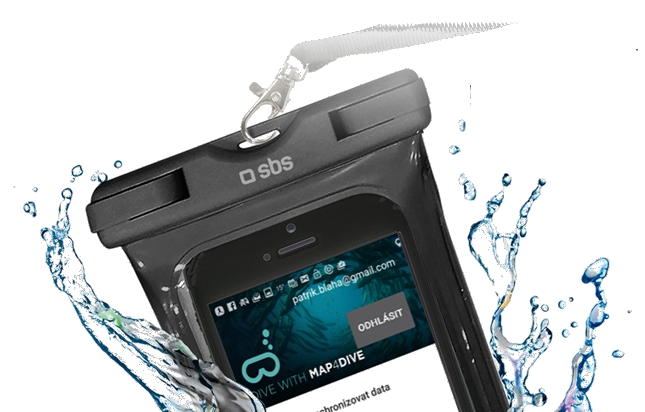
Underwater case selection


faeture plan


When designing an application, I considered the use of soft or hard "photo" cases to protect the mobile during the dive. Hard bushings are designed to depths of 30 or 40 m depending on the type. Soft underwater housings are designed by manufacturers for depths up to 10 m, but in principle they seal with better depth - only the stiffness of the inserted mobile is restricted.

Based on the initial tests, we decided to support soft plastic cases. Compared to hard "photo cases" they have the following advantages:

  • easy accessibility, low price, compatibility with almost all mobiles (photo cases exist only for a few models, to order mostly from China, price around 100USD)
  • Full functionality of the phone in the case (except for fingerprint reader and charger jacks and headphones) - that is, You can shove the phone during the preparation or dive, it is not necessary to solve it just before the dive, immediately after emergence, the phone can be used eg for emergency calls
  • The tightness of the case increases with the increasing depth - the constraint is only the rigidity of the built-in phone design - we have leak tightness and functionality at depths of about 50m
  • Durability, durability, less susceptibility to "user error" and easier verification of watertightness - unless the case is unmarked, it is almost indestructible (compared to fragile photo bags with problematic O-ring seals). If the bush holds air - it is almost certain that it is okay.

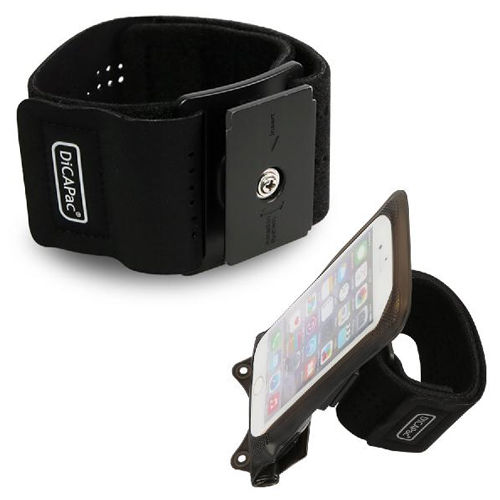
Testing has proven to be a handy holster with a strap (ideal for navigation during a dive), and the ability to easily detach the case from the strap for shooting purposes. At the same time, care must be taken to ensure that the edges of the case do not overlap with the proximity and light sensor, and at the same time maximally cover the mechanical controls for switching on / off the cellphone and volume - we have proven the DiCAPac Action WP - C1A case (this is the Samsung S5 test size).


Invitation to test


faeture plan